students_1 <- data.frame(
  student = c("A", "B", "C", "A"),
  class = c("STAT 101", "GEOL 101", "ANTH 101", "GEOL 101")
)

# Check it out
students_1
##   student    class
## 1       A STAT 101
## 2       B GEOL 101
## 3       C ANTH 101
## 4 A GEOL 10111 Joining Data
NoteLearning goals
Understand how to join different datasets:
- mutating joins:
left_join(),inner_join()andfull_join() - filtering joins:
semi_join(),anti_join()
NoteAdditional resources
Watch:
- Demonstration of joining data (Lisa Lendway)
Read:
- Joings (Wickham, Çetinkaya-Rundel, & Grolemund)
- Data wrangling on multiple tables (Baumer, Kaplan, and Horton)
11.1 Warm-up
Where are we? Data preparation
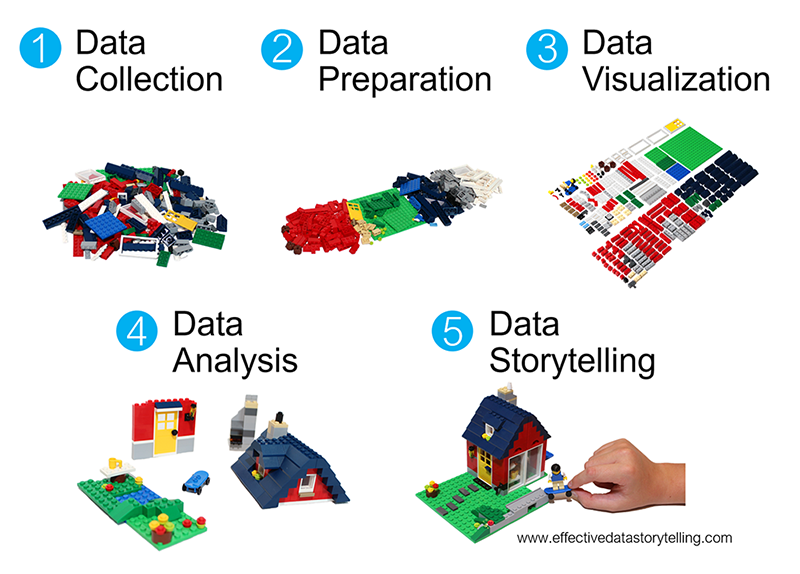
Thus far, we’ve learned how to:
arrange()our data in a meaningful order- subset the data to only
filter()the rows andselect()the columns of interest mutate()existing variables and define new variablessummarize()various aspects of a variable, both overall and by group (group_by())- reshape our data to fit the task at hand (
pivot_longer(),pivot_wider())
Motivation
In practice, we often have to collect and combine data from various sources in order to address our research questions. Example:
- What are the best predictors of album sales?
Combine:- Spotify data on individual songs (eg: popularity, genre, characteristics)
- sales data on individual songs
- What are the best predictors of flight delays?
Combine:- data on individual flights including airline, starting airport, and destination airport
- data on different airlines (eg: ticket prices, reliability, etc)
- data on different airports (eg: location, reliability, etc)
EXAMPLE 1
Consider the following (made up) data on students and course enrollments:
enrollments_1 <- data.frame(
  class = c("STAT 101", "ART 101", "GEOL 101"),
  enrollment = c(18, 17, 24)
)

# Check it out
enrollments_1
##      class enrollment
## 1 STAT 101         18
## 2  ART 101         17
## 3 GEOL 101         24
Imagine someone says to you: “For each student, I want to know the enrollment of each class the student is taking.”
Work this out by hand: make a table with three columns: student, class, enrollment.
Here are the two datasets side-by-side:

When you are done: think very carefully about how you constructed your table and exactly what you did with the two tables to get the numbers in the enrollment column.
Write a short sentence describing what you did.
Other questions
Do these questions, at the very least, sound plausible? That someone might actually ask them?
“For each student, I want to know the enrollment of each class the student is taking, but I don’t care about any student for whom we don’t have enrollment data.”
“I need to know that enrollment data for all of the students – and I also want to see which courses don’t have any of these students enrolled in them.”
“I want to see students and classes for which there’s no matching enrollment data.”
11.1.1 Joins
Answering the questions above required you to combine or join these datasets into one.
How can we make R do the same thing we did when making our table?
First, consider the following:
What variable or key do these datasets have in common? Thus by what information can we match the observations in these datasets?
Relative to this key, what info does
students_1have thatenrollments_1doesn’t?Relative to this key, what info does
enrollments_1have thatstudents_1doesn’t?
EXAMPLE 2
There are various ways to join these datasets:

> students_1                    > enrollments_1
  student    class                   class enrollment
1       A STAT 101              1 STAT 101         18
2       B GEOL 101              2  ART 101         17
3       C ANTH 101              3 GEOL 101         24
4       A GEOL 101
a8a2bd2 (Add joins activity)
Let’s learn by doing. First, try the left_join() function:
library(tidyverse)
students_1 %>%
  left_join(enrollments_1)
##   student    class enrollment
## 1       A STAT 101         18
## 2       B GEOL 101         24
## 3       C ANTH 101         NA
## 4       A GEOL 101         24
What did this do?
Which observations from
students_1(the left table) were retained?Which observations from
enrollments_1(the right table) were retained?What, if anything, would change if we reversed the order of the data tables? Think about it, then try.
left_join(enrollments_1, students_1)
##      class enrollment student
## 1 STAT 101         18       A
## 2  ART 101         17    <NA>
## 3 GEOL 101         24       B
## 4 GEOL 101         24       A
EXAMPLE 3
Next, explore how our datasets are joined using inner_join():
> students_1                    > enrollments_1
  student    class                   class enrollment
1       A STAT 101              1 STAT 101         18
2       B GEOL 101              2  ART 101         17
3       C ANTH 101              3 GEOL 101         24
4       A GEOL 101
students_1 %>%
inner_join(enrollments_1)
## student class enrollment
## 1 A STAT 101 18
## 2 B GEOL 101 24
## 3 A GEOL 101 24What did this do?
Which observations from
students_1(the left table) were retained?Which observations from
enrollments_1(the right table) were retained?What, if anything, would change if we reversed the order of the data tables? Think about it, then try.
EXAMPLE 4
Next, explore how our datasets are joined using full_join():
students_1 %>%
full_join(enrollments_1)
## student class enrollment
## 1 A STAT 101 18
## 2 B GEOL 101 24
## 3 C ANTH 101 NA
## 4 A GEOL 101 24
## 5 <NA> ART 101 17What did this do?
Which observations from
students_1(the left table) were retained?Which observations from
enrollments_1(the right table) were retained?What, if anything, would change if we reversed the order of the data tables? Think about it, then try.
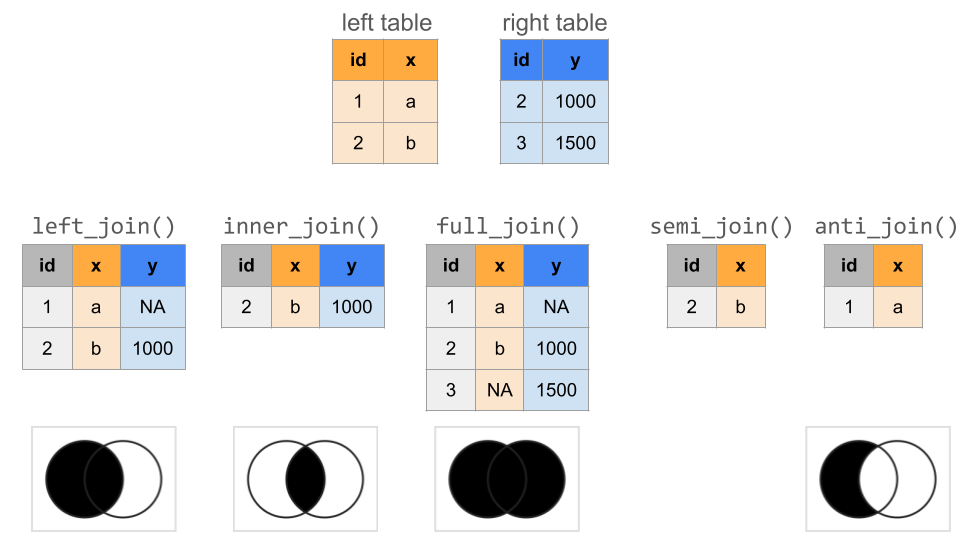
Mutating joins: left, inner, full
Mutating joins add new variables (columns) to the left data table from matching observations in the right table:
left_data %>% mutating_join(right_data)
The most common mutating joins are:
left_join()
Keeps all observations from the left, but discards any observations in the right that do not have a match in the left.1inner_join()
Keeps only the observations from the left with a match in the right.full_join()
Keeps all observations from the left and the right. (This is less common thanleft_join()andinner_join()).
NOTE: When an observation in the left table has multiple matches in the right table, these mutating joins produce a separate observation in the new table for each match.
EXAMPLE 5
Mutating joins combine information, thus increase the number of columns in a dataset (like mutate()). Filtering joins keep only certain observations in one dataset (like filter()), not based on rules related to any variables in the dataset, but on the observations that exist in another dataset. This is useful when we merely care about the membership or non-membership of an observation in the other dataset, not the raw data itself.
In our example data, suppose enrollments_1 only included courses being taught in the Theater building:
students_1 %>%
semi_join(enrollments_1)
## student class
## 1 A STAT 101
## 2 B GEOL 101
## 3 A GEOL 101What did this do? What info would it give us?
How does
semi_join()differ frominner_join()?What, if anything, would change if we reversed the order of the data tables? Think about it, then try.
EXAMPLE 6
Let’s try another filtering join for our example data:
students_1 %>%
anti_join(enrollments_1)
## student class
## 1 C ANTH 101What did this do? What info would it give us?
What, if anything, would change if we reversed the order of the data tables? Think about it, then try.
Filtering joins: semi, anti
Filtering joins keep specific observations from the left table based on whether they match an observation in the right table.
semi_join()
Discards any observations in the left table that do not have a match in the right table. If there are multiple matches of right cases to a left case, it keeps just one copy of the left case.anti_join()
Discards any observations in the left table that do have a match in the right table.
A SUMMARY OF ALL OF OUR JOINS
Useful RStudio cheat sheets:
- Data transformation cheat sheet: HTML, PDF
- Includes our 6 wrangling verbs and joins
- Data tidying cheat sheet: HTML, PDF
- Includes
pivot_longer()andpivot_wider()for reshaping our data
- Includes
11.2 Exercises
Goals
Now that we understand the basics, let’s:
- Explore some subtleties of the
join()functions. - Apply the
join()functions to bigger datasets.
Directions
- Work together and stay in relative sync! You should not be on Exercise 10 if the group is on Exercise 2.
- Help create an environment where everyone feels comfortable asking questions and sharing ideas. Again, this is hard to do if you’re on Exercise 10 while the group is on Exercise 2.
- When you have questions, speak up. First discuss your question with the group. If the group cannot identify a solution, ask me!
Exercise 1: Where are my keys?
Part a
Define two new datasets, with different students and courses:
students_2 <- data.frame(
student = c("D", "E", "F"),
class = c("COMP 101", "BIOL 101", "POLI 101")
)
# Check it out
students_2
## student class
## 1 D COMP 101
## 2 E BIOL 101
## 3 F POLI 101
enrollments_2 <- data.frame(
course = c("ART 101", "BIOL 101", "COMP 101"),
enrollment = c(18, 20, 19)
)
# Check it out
enrollments_2
## course enrollment
## 1 ART 101 18
## 2 BIOL 101 20
## 3 COMP 101 19To connect the course enrollments to the students’ courses, try do a left_join(). You get an error! Identify the problem by reviewing the error message and the datasets we’re trying to join.
# eval = FALSE: don't evaluate this chunk when knitting. it produces an error.
students_2 %>%
left_join(enrollments_2)Part b
The problem is that course name, the key or variable that links these two datasets, is labeled differently: class in the students_2 data and course in the enrollments_2 data. Thus we have to specify these keys in our code:
students_2 %>%
left_join(enrollments_2, by = c("class" = "course"))
## student class enrollment
## 1 D COMP 101 19
## 2 E BIOL 101 20
## 3 F POLI 101 NA# The order of the keys is important:
# by = c("left data key" = "right data key")
# The order is mixed up here, thus we get an error:
students_2 %>%
left_join(enrollments_2, by = c("course" = "class"))Part c
Define another set of fake data which adds grade information:
# Add student grades in each course
students_3 <- data.frame(
student = c("Y", "Y", "Z", "Z"),
class = c("COMP 101", "BIOL 101", "POLI 101", "COMP 101"),
grade = c("B", "S", "C", "A")
)
# Check it out
students_3
## student class grade
## 1 Y COMP 101 B
## 2 Y BIOL 101 S
## 3 Z POLI 101 C
## 4 Z COMP 101 A
# Add average grades in each course
enrollments_3 <- data.frame(
class = c("ART 101", "BIOL 101","COMP 101"),
grade = c("B", "A", "A-"),
enrollment = c(20, 18, 19)
)
# Check it out
enrollments_3
## class grade enrollment
## 1 ART 101 B 20
## 2 BIOL 101 A 18
## 3 COMP 101 A- 19Try doing a left_join() to link the students’ classes to their enrollment info. Did this work? Try and figure out the culprit by examining the output.
students_3 %>%
left_join(enrollments_3)
## student class grade enrollment
## 1 Y COMP 101 B NA
## 2 Y BIOL 101 S NA
## 3 Z POLI 101 C NA
## 4 Z COMP 101 A NAPart d
The issue here is that our datasets have 2 column names in common: class and grade. BUT grade is measuring 2 different things here: individual student grades in students_3 and average student grades in enrollments_3. Thus it doesn’t make sense to try to join the datasets with respect to this variable. We can again solve this by specifying that we want to join the datasets using the class variable or key. What are grade.x and grade.y?
students_3 %>%
left_join(enrollments_3, by = c("class" = "class"))
## student class grade.x grade.y enrollment
## 1 Y COMP 101 B A- 19
## 2 Y BIOL 101 S A 18
## 3 Z POLI 101 C <NA> NA
## 4 Z COMP 101 A A- 19
Exercise 2: More small practice
Before applying these ideas to bigger datasets, let’s practice identifying which join is appropriate in different scenarios. Define the following fake data on voters (people who have voted) and contact info for voting age adults (people who could vote):
# People who have voted
voters <- data.frame(
id = c("A", "D", "E", "F", "G"),
times_voted = c(2, 4, 17, 6, 20)
)
voters
## id times_voted
## 1 A 2
## 2 D 4
## 3 E 17
## 4 F 6
## 5 G 20
# Contact info for voting age adults
contact <- data.frame(
name = c("A", "B", "C", "D"),
address = c("summit", "grand", "snelling", "fairview"),
age = c(24, 89, 43, 38)
)
contact
## name address age
## 1 A summit 24
## 2 B grand 89
## 3 C snelling 43
## 4 D fairview 38Use the appropriate join for each prompt below. In each case, think before you type:
- What dataset goes on the left?
- What do you want the resulting dataset to look like? How many rows and columns will it have?
# 1. We want contact info for people who HAVEN'T voted
# 2. We want contact info for people who HAVE voted
# 3. We want any data available on each person
# 4. When possible, we want to add contact info to the voting roster
Exercise 3: Bigger datasets
Let’s apply these ideas to some bigger datasets. In grades, each row is a student-class pair with information on:
sid= student IDsessionID= an identifier of the class sectiongrade= student’s grade
In courses, each row corresponds to a class section with information on:
sessionID= an identifier of the class sectiondept= departmentlevel= course level (eg: 100)sem= semesterenroll= enrollment (number of students)iid= instructor ID
Use R code to take a quick glance at the data.
# How many observations (rows) and variables (columns) are there in the grades data?
# How many observations (rows) and variables (columns) are there in the courses data?
Exercise 4: Class size
How big are the classes?
Part a
Before digging in, note that some courses are listed twice in the courses data:
courses %>%
count(sessionID) %>%
filter(n > 1)
## sessionID n
## 1 session2047 2
## 2 session2067 2
## 3 session2448 2
## 4 session2509 2
## 5 session2541 2
## 6 session2824 2
## 7 session2826 2
## 8 session2862 2
## 9 session2897 2
## 10 session3046 2
## 11 session3057 2
## 12 session3123 2
## 13 session3243 2
## 14 session3257 2
## 15 session3387 2
## 16 session3400 2
## 17 session3414 2
## 18 session3430 2
## 19 session3489 2
## 20 session3524 2
## 21 session3629 2
## 22 session3643 2
## 23 session3821 2If we pick out just 1 of these, we learn that some courses are cross-listed in multiple departments:
courses %>%
filter(sessionID == "session2047")For our class size exploration, obtain the total enrollments in each sessionID, combining any cross-listed sections. Save this as courses_combined. NOTE: There’s no joining to do here!
# courses_combined <- courses %>%
# ___(sessionID) %>%
# ___(enroll = sum(___))
# Check that this has 1695 rows and 2 columns
# dim(courses_combined)Part b
Let’s first examine the question of class size from the administration’s viewpoint. To this end, calculate the median class size across all class sections. (The median is the middle or 50th percentile. Unlike the mean, it’s not skewed by outliers.) THINK FIRST:
- Which of the 2 datasets do you need to answer this question? One? Both?
- If you need course information, use
courses_combinednotcourses. - Do you have to do any joining? If so, which dataset will go on the left, i.e. which dataset includes your primary observations of interest? Which join function will you need?
Part c
But how big are classes from the student perspective? To this end, calculate the median class size for each individual student. Once you have the correct output, store it as student_class_size. THINK FIRST:
- Which of the 2 datasets do you need to answer this question? One? Both?
- If you need course information, use
courses_combinednotcourses. - Do you have to do any joining? If so, which dataset will go on the left, i.e. which dataset includes your primary observations of interest? Which join function will you need?
Part d
The median class size varies from student to student. To get a sense for the typical student experience and range in student experiences, construct and discuss a histogram of the median class sizes experienced by the students.
# ggplot(student_class_size, aes(x = ___)) +
# geom___()
Exercise 5: Narrowing in on classes
Part a
Show data on the students that enrolled in session1986. THINK FIRST: Which of the 2 datasets do you need to answer this question? One? Both?
Part b
Below is a dataset with all courses in department E:
dept_E <- courses %>%
filter(dept == "E")What students enrolled in classes in department E? (We just want info on the students, not the classes.)
Exercise 6: All the wrangling
Use all of your wrangling skills to answer the following prompts! THINK FIRST:
- Think about what tables you might need to join (if any). Identify the corresponding variables to match.
- You’ll need an extra table to convert grades to grade point averages:
gpa_conversion <- tibble(
grade = c("A+", "A", "A-", "B+", "B", "B-", "C+", "C", "C-", "D+", "D", "D-", "NC", "AU", "S"),
gp = c(4.3, 4, 3.7, 3.3, 3, 2.7, 2.3, 2, 1.7, 1.3, 1, 0.7, 0, NA, NA)
)
gpa_conversion
## # A tibble: 15 × 2
## grade gp
## <chr> <dbl>
## 1 A+ 4.3
## 2 A 4
## 3 A- 3.7
## 4 B+ 3.3
## 5 B 3
## 6 B- 2.7
## 7 C+ 2.3
## 8 C 2
## 9 C- 1.7
## 10 D+ 1.3
## 11 D 1
## 12 D- 0.7
## 13 NC 0
## 14 AU NA
## 15 S NAPart a
How many total student enrollments are there in each department? Order from high to low.
Part b
What’s the grade-point average (GPA) for each student?
Part c
What’s the median GPA across all students?
Part d
What fraction of grades are below B+?
Part e
What’s the grade-point average for each instructor? Order from low to high.
Part f
CHALLENGE: Estimate the grade-point average for each department, and sort from low to high. NOTE: Don’t include cross-listed courses. Students in cross-listed courses could be enrolled under either department, and we do not know which department to assign the grade to. HINT: You’ll need to do multiple joins.
Exercise 7: HOMEWORK PRACTICE
This exercise is on Homework 4, thus no solutions are provided. In Homework 4, you’ll be working with the Birthdays data:
library(mosaic)
data("Birthdays")
head(Birthdays)
## state year month day date wday births
## 1 AK 1969 1 1 1969-01-01 Wed 14
## 2 AL 1969 1 1 1969-01-01 Wed 174
## 3 AR 1969 1 1 1969-01-01 Wed 78
## 4 AZ 1969 1 1 1969-01-01 Wed 84
## 5 CA 1969 1 1 1969-01-01 Wed 824
## 6 CO 1969 1 1 1969-01-01 Wed 100You’ll also be exploring how the number of daily births is (or isn’t!) related to holidays. To this end, import data on U.S. federal holidays here. NOTE: lubridate::dmy() converts the character-string date stored in the CSV to a “POSIX” date-number.
holidays <- read.csv("https://mac-stat.github.io/data/US-Holidays.csv") %>%
mutate(date = as.POSIXct(lubridate::dmy(date)))Part a
Create a new dataset, daily_births_1980, which:
- keeps only
daily_birthsrelated to 1980 - adds a variable called
is_holidaywhich isTRUEwhen the day is a holiday, andFALSEotherwise. NOTE:!is.na(x)isTRUEif columnxis not NA, andFALSEif it is NA.
Print out the first 6 rows and confirm that your dataset has 366 rows (1 per day in 1980) and 7 columns. HINT: You’ll need to combine 2 different datasets.
# Define daily_births_1980
# Check out the first 6 rows
# Confirm that daily_births_1980 has 366 rows and 7 columnsPart b
Plot the total number of babies born (y-axis) per day (x-axis) in 1980. Color each date according to its day of the week, and shape each date according to whether or not it’s a holiday. (This is a modified version of 3c!)
Part c
Discuss your observations. For example: To what degree does the theory that there tend to be fewer births on holidays hold up? What holidays stand out the most?
Part d (OPTIONAL)
Some holidays stand out more than others. It would be helpful to label them. Use geom_text to add labels to each of the holidays. NOTE: You can set the orientation of a label with the angle argument; e.g., geom_text(angle = 40, ...).
Next steps
If you finish early, work on upcoming assignments for this course.
11.3 Wrap-up
- Homework 4 and Quiz 1 Revisions are due tonight.
- Reflection 1 is due tomorrow night.
- Homework 5 is available and due next Thursday.
- Thursday: we will not have regular class. Instead:
- Attend 2 talks during MSCS Capstone Days. There are more than 100 talks to choose from! You can go to any 2 that you want.
- Complete and submit the capstone reflection assignment (CP10.5), due Friday, March 6.
- In total, attending the talks and completing the assignment shouldn’t take more than 1.5 hours (our class time).
11.4 Solutions
Click for Solutions
EXAMPLE 1
What variable or key do these datasets have in common? Thus by what information can we match the observations in these datasets?
The class taken.Relative to this key, what info does
students_1have thatenrollments_1doesn’t?
a student that took ANTH 101Relative to this key, what info does
enrollments_1have thatstudents_1doesn’t?
data on ART 101
EXAMPLE 2
- What did this do?
Linked course info to all students instudents_1 - Which observations from
students_1(the left table) were retained?
All of them. - Which observations from
enrollments_1(the right table) were retained?
Only STAT and GEOL, those that matched the students. - What, if anything, would change if we reversed the order of the data tables? Think about it, then try.
We retain the courses, not students.
students_1 %>%
left_join(enrollments_1)
## student class enrollment
## 1 A STAT 101 18
## 2 B GEOL 101 24
## 3 C ANTH 101 NA
## 4 A GEOL 101 24
enrollments_1 %>%
left_join(students_1)
## class enrollment student
## 1 STAT 101 18 A
## 2 ART 101 17 <NA>
## 3 GEOL 101 24 B
## 4 GEOL 101 24 A
EXAMPLE 3
Which observations from
students_1(the left table) were retained?
A and B, only those with enrollment info.Which observations from
enrollments_1(the right table) were retained?
STAT and GEOL, only those with student info.What, if anything, would change if we reversed the order of the data tables? Think about it, then try.
Same info, different column order.
students_1 %>%
  inner_join(enrollments_1)
##   student    class enrollment
## 1       A STAT 101         18
## 2       B GEOL 101         24
## 3       A GEOL 101         24
enrollments_1 %>%
inner_join(students_1)
## class enrollment student
## 1 STAT 101 18 A
## 2 GEOL 101 24 B
## 3 GEOL 101 24 A
EXAMPLE 4
- Which observations from
students_1(the left table) were retained?
All - Which observations from
enrollments_1(the right table) were retained?
All - What, if anything, would change if we reversed the order of the data tables? Think about it, then try.
Same data, different order.
students_1 %>%
  full_join(enrollments_1)
##   student    class enrollment
## 1       A STAT 101         18
## 2       B GEOL 101         24
## 3       C ANTH 101         NA
## 4       A GEOL 101         24
## 5    <NA>  ART 101         17
enrollments_1 %>%
full_join(students_1)
## class enrollment student
## 1 STAT 101 18 A
## 2 ART 101 17 <NA>
## 3 GEOL 101 24 B
## 4 GEOL 101 24 A
## 5 ANTH 101 NA C
EXAMPLE 5
- Which observations from
students_1(the left table) were retained?
Only those with enrollment info. - Which observations from
enrollments_1(the right table) were retained?
None. - How does
semi_join()differ frominner_join()?semi_join()is a filtering join and doesn’t add information from the variables in the second (“right hand side”) dataset. It just filters the rows from the first (“left hand side”) dataset based on the keys in the second dataset. - What, if anything, would change if we reversed the order of the data tables? Think about it, then try.
Depending on the order, we keep only student info or only enrollment info and can get a different number of rows.
students_1 %>%
  semi_join(enrollments_1)
##   student    class
## 1       A STAT 101
## 2       B GEOL 101
## 3       A GEOL 101
enrollments_1 %>%
semi_join(students_1)
## class enrollment
## 1 STAT 101 18
## 2 GEOL 101 24
EXAMPLE 6
- Which observations from
students_1(the left table) were retained?
Only C, the one without enrollment info. - Which observations from
enrollments_1(the right table) were retained?
None. - What, if anything, would change if we reversed the order of the data tables? Think about it, then try.
Retain only ART 101, the course with no student info.
students_1 %>%
  anti_join(enrollments_1)
##   student    class
## 1       C ANTH 101
enrollments_1 %>%
anti_join(students_1)
## class enrollment
## 1 ART 101 17
Exercise 2: More small practice
# 1. We want contact info for people who HAVEN'T voted
contact %>%
  anti_join(voters, by = c("name" = "id"))
##   name  address age
## 1    B    grand  89
## 2    C snelling  43

# 2. We want contact info for people who HAVE voted
contact %>%
  semi_join(voters, by = c("name" = "id"))
##   name  address age
## 1    A   summit  24
## 2    D fairview  38

# 3. We want any data available on each person
contact %>%
  full_join(voters, by = c("name" = "id"))
##   name  address age times_voted
## 1    A   summit  24           2
## 2    B    grand  89          NA
## 3    C snelling  43          NA
## 4    D fairview  38           4
## 5    E     <NA>  NA          17
## 6    F     <NA>  NA           6
## 7    G     <NA>  NA          20
voters %>%
  full_join(contact, by = c("id" = "name"))
##   id times_voted  address age
## 1  A           2   summit  24
## 2  D           4 fairview  38
## 3  E          17     <NA>  NA
## 4  F           6     <NA>  NA
## 5  G          20     <NA>  NA
## 6  B          NA    grand  89
## 7  C          NA snelling  43

# 4. We want to add contact info, when possible, to the voting roster
voters %>%
  left_join(contact, by = c("id" = "name"))
##   id times_voted  address age
## 1  A           2   summit  24
## 2  D           4 fairview  38
## 3  E          17     <NA>  NA
## 4  F           6     <NA>  NA
## 5  G          20     <NA>  NA
Exercise 3: Bigger datasets
# How many observations (rows) and variables (columns) are there in the grades data?
dim(grades)
## [1] 5844    3

# How many observations (rows) and variables (columns) are there in the courses data?
dim(courses)
## [1] 1718    6
Exercise 4: Class size
Part a
courses_combined <- courses %>%
  group_by(sessionID) %>%
  summarize(enroll = sum(enroll))

# Check that this has 1695 rows and 2 columns
dim(courses_combined)
## [1] 1695    2
Part b
courses_combined %>%
  summarize(median(enroll))
## # A tibble: 1 × 1
##   `median(enroll)`
##              <int>
## 1               18
Part c
student_class_size <- grades %>%
  left_join(courses_combined) %>%
  group_by(sid) %>%
  summarize(med_class = median(enroll))

head(student_class_size)
## # A tibble: 6 × 2
##   sid    med_class
##   <chr>      <dbl>
## 1 S31185      23.5
## 2 S31188      21
## 3 S31191      25
## 4 S31194      15
## 5 S31197      24
## 6 S31200      21
Part d
ggplot(student_class_size, aes(x = med_class)) +
  geom_histogram(color = "white")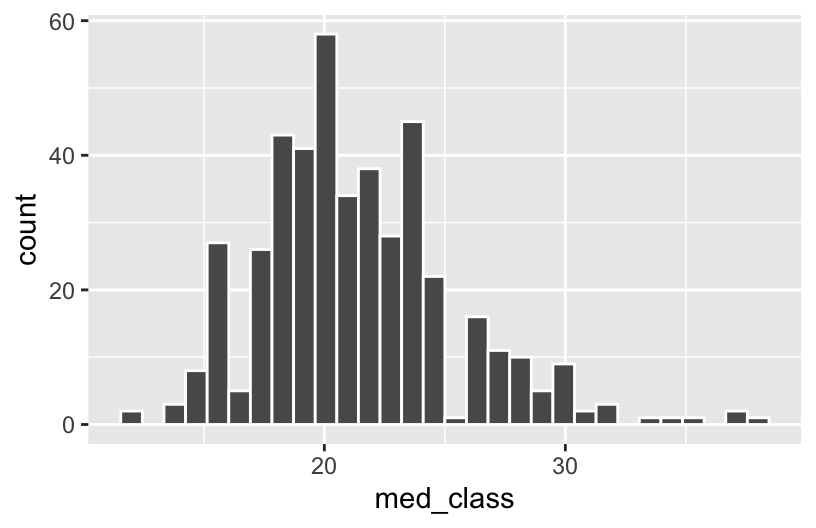
Exercise 5: Narrowing in on classes
Part a
grades %>%
  filter(sessionID == "session1986")
Part b
grades %>%
  semi_join(dept_E)
Exercise 6: All the wrangling
Part a
courses %>%
  group_by(dept) %>%
  summarize(total = sum(enroll)) %>%
  arrange(desc(total))
Part b
grades %>%
  left_join(gpa_conversion) %>%
  group_by(sid) %>%
  summarize(mean(gp, na.rm = TRUE))
Part c
grades %>%
  left_join(gpa_conversion) %>%
  group_by(sid) %>%
  summarize(gpa = mean(gp, na.rm = TRUE)) %>%
  summarize(median(gpa))
Part d
# There are lots of approaches here!
grades %>%
  left_join(gpa_conversion) %>%
  mutate(below_b_plus = (gp < 3.3)) %>%
  summarize(mean(below_b_plus, na.rm = TRUE))
Part e
grades %>%
  left_join(gpa_conversion) %>%
  left_join(courses) %>%
  group_by(iid) %>%
  summarize(gpa = mean(gp, na.rm = TRUE)) %>%
  arrange(gpa)
Part f
cross_listed <- courses %>%
  count(sessionID) %>%
  filter(n > 1)

grades %>%
  anti_join(cross_listed) %>%
  inner_join(courses) %>%
  left_join(gpa_conversion) %>%
  group_by(dept) %>%
  summarize(gpa = mean(gp, na.rm = TRUE)) %>%
  arrange(gpa)
There is also a
right_join()that adds variables in the reverse direction from the left table to the right table, but we do not really need it as we can always switch the roles of the two tables.︎↩︎